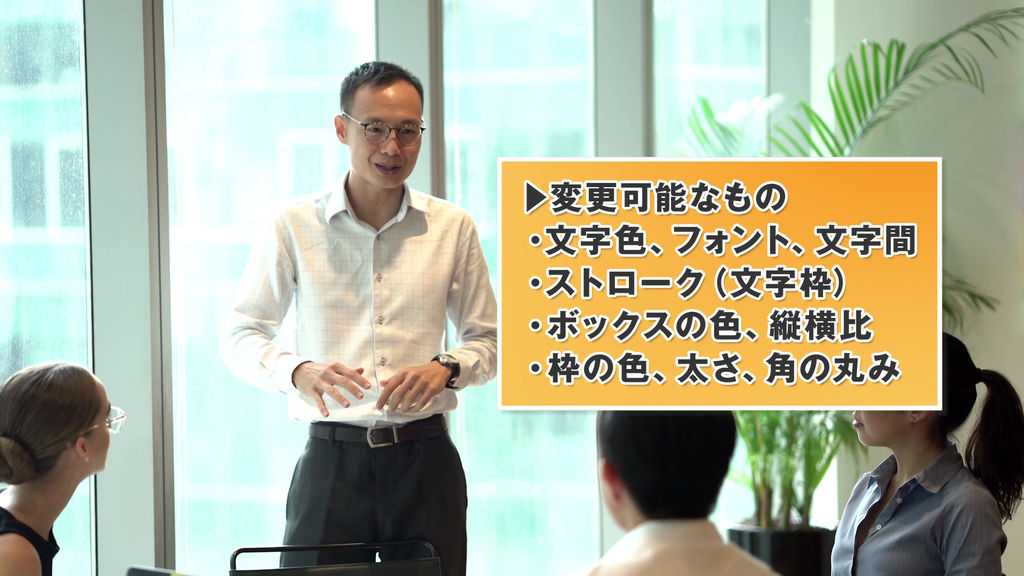
I created a telop box that rotates and comes out.
I think it's perfect for summarizing the main points of business YouTube videos and displaying the table of contents!
When you replace the text, the size of the box will be adjusted automatically.
(Paragraphs are left-justified.)
You can freely change the color and font, and you can also add strokes (borders) and shadows to the characters.
Please customize and use it to your liking!
You can load it into Adobe Premiere Pro and use it immediately.
――――――――
Below is a detailed description of the product.
(If you are interested)
[What you can do]
- Change text content, color, font, stroke thickness / color / opacity, drop shadow opacity, and character spacing (tracking)
- Change the color, aspect ratio, rounded corners, and opacity of the telop box
- Change the color and thickness of the outer frame of the telop box
- The size of the telop box is automatically adjusted according to the text.
- If you change the scale, the animation will be adjusted automatically.
- If you do not need motion, cut the motion part before use.
[What you can NOT do]
- Character decoration other than the above (double stroke, add glow, etc.)
- Separate colors and fonts for each character in one telop box (→ Please use two or more layers)
- Other things not mentioned in "What you can do"
* If you enter too many characters on one line, the edges may be cut off. If it becomes long, please use a line break.
(Approximately: 15 characters or less per line)
[how to use]
1. Click "Graphics"> "Install Motion Graphics Template" on the top menu of Premiere Pro.
2. Specify the downloaded file (mogrt) and click "Open".
* For (1) and (2), you can also drag and drop the file directly to the "Essential Graphics" panel.
3. It will be installed as a template in the "Essential Graphics" panel.
* If the panel is not displayed, check "Window"> "Essential Graphics" in the upper menu to display it.
4. Find the installed telop from the "Browse" tab of the "Essential Graphics" panel, and drag and drop it onto the timeline panel.
[Method of operation]
With the telop added to the timeline panel selected, you can operate the text content, size, etc. on the "Edit" tab of the "Essential Graphics" panel.
You can also adjust the size and position of the entire telop in "Motion" in the "Effect Control" panel.
Let's do a good video editing!
- Code
- 16545786
- Type
- Motion Graphics template
- Required software
- Premiere Pro et supérieur
- Taille de Fichier
- 83.7 kB
- Licence
- Libre de Droits