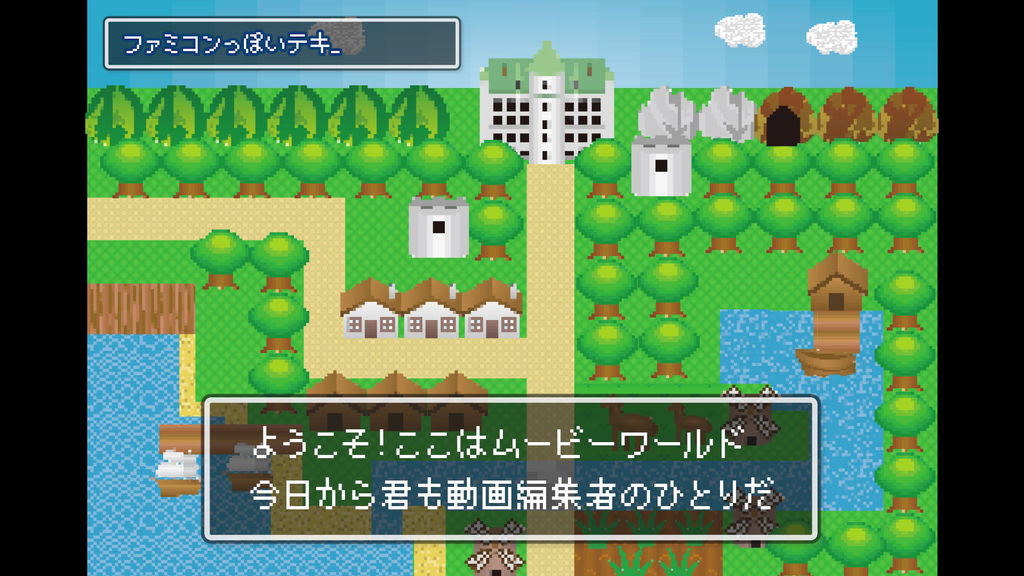
An old-fashioned retro atmosphere. I created a NES-style text box.
It comes with an animation that a box appears and characters are input while being a little jerky.
I think it's perfect for entertainment YouTube videos and live game videos!
When you replace the text, the size of the box will be adjusted automatically.
(Paragraphs are left-justified.)
You can freely change the color and font, and you can also add strokes (borders) and shadows to the characters.
Please customize it to your liking!
You can load it into Adobe Premiere Pro and use it immediately.
[!!] The font data has a link in the "readme".
Please download and use that as well.
――――――――
Below is a detailed description of the product.
(If you are interested)
[What you can do]
- Change text content, color, font, stroke thickness / color / opacity, drop shadow opacity, and character spacing (tracking)
- Change the color, aspect ratio, rounded corners, and opacity of the text box
- Change the color and thickness of the outer frame of the text box
- The size of the text box is automatically adjusted according to the text.
- If you change the scale, the animation will be adjusted automatically.
- If you do not need motion, cut the motion part before use.
[Method of operation]
With the template added to the timeline panel selected, you can operate the text content, size, etc. on the "Edit" tab of the "Essential Graphics" panel.
You can also adjust the size and position of the entire template in "Motion" in the "Effect Control" panel.
Let's do a good video editing!
- Code
- 16584863
- Type
- Motion Graphics template
- Required software
- Premiere Pro et supérieur
- Taille de Fichier
- 40.2 kB
- Licence
- Libre de Droits