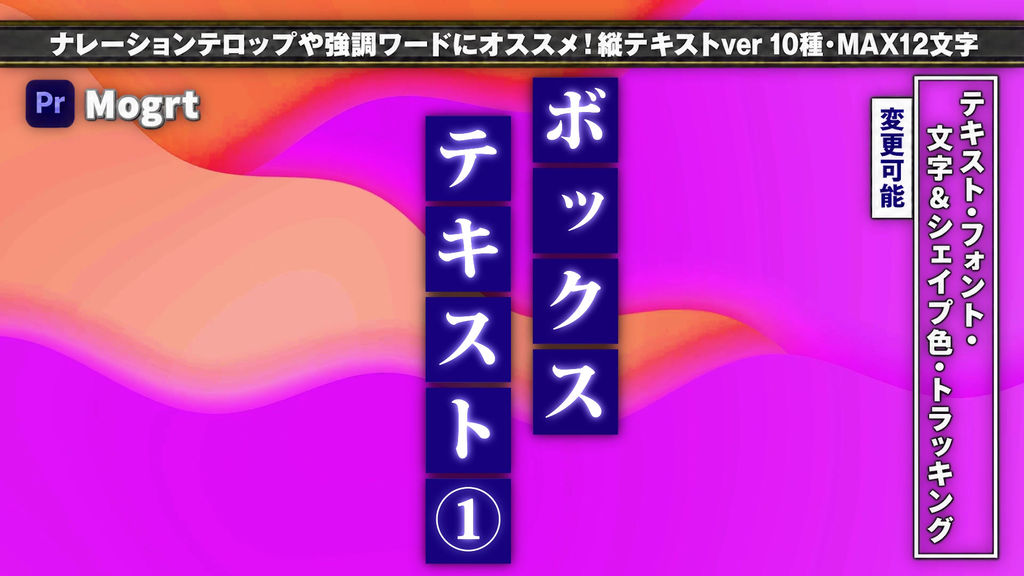
A collection of 10 vertically arranged box text animations for narration captions, keywords, and attention-grabbing titles.
Each character is placed inside its own box in a vertical layout. Directional wipes and center-out scaling help your words stand out.
Use beside your footage, as a vertical headline, or to highlight a short phrase. Great for YouTube videos, explainers, interviews, and Japanese-style presentations.
━━━━━━━━━━━━━━
■ Included Animations
━━━━━━━━━━━━━━
・Top-to-bottom wipe
・Right-to-left wipe
・Bottom-to-top wipe
・Left-to-right wipe
・Mixed-direction wipes: 4 variations
・Center-out scaling
・Center-out scaling with staggered timing
10 templates: BOX TEXT(V)_01–10
━━━━━━━━━━━━━━
■ Customizable Controls
━━━━━━━━━━━━━━
・Text, font, and text size
・Overall size, position, and text offsets
・Text colors, box color, and outline color
・Tracking, box spacing, and outline width
・Glow radius
Supports up to 12 characters.
━━━━━━━━━━━━━━
■ How to Use
━━━━━━━━━━━━━━
1. Launch Adobe Premiere Pro.
2. Install the MOGRT files in the Graphics Templates panel.
3. Drag a template onto your timeline.
4. Customize the text and design in the Properties panel.
※ Important: Resizing
Changing the overall size may affect tracking (character spacing).
After resizing, adjust the Tracking parameter to align the characters.
※ Adobe Premiere Pro CC 2026 or later is recommended.
- Код
- 56490963
- Тип
- 动态图形模板
- Required software
- Premiere Pro и выше
- Длительность
- 00:10
- Размеры
- 1920px x 1080px
- File size
- 1.7 MB
- Лицензия
- Без комиссий
- Text Заполнители
- 1