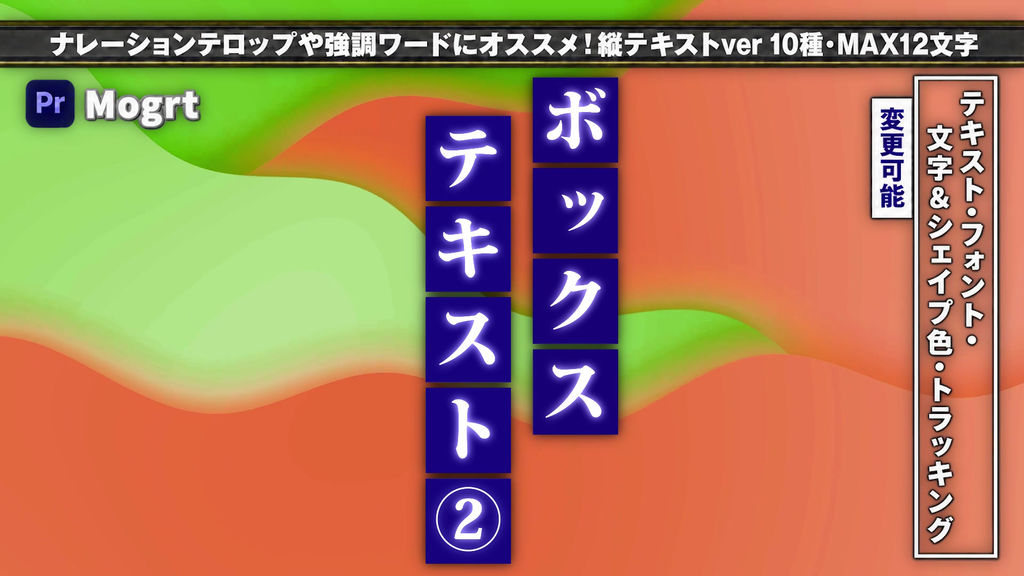
A collection of 10 vertically arranged box text animations featuring staggered reveals and center-out wipes.
Reveal characters from top to bottom, alternate wipe directions, or open each box from its center to add rhythm to vertical captions and highlighted words.
Great for YouTube videos, explainers, entertainment content, and Japanese-style presentations.
━━━━━━━━━━━━━━
■ Included Animations
━━━━━━━━━━━━━━
・Staggered mixed-direction wipes: 4 variations
・Center-out vertical opening
・Center-out horizontal opening
・Alternating vertical and horizontal opening
・Alternating horizontal and vertical opening
・Staggered alternating opening, starting vertically
・Staggered alternating opening, starting horizontally
10 templates: BOX TEXT(V)_11–20
Staggered variations use a 5-frame delay between characters.
━━━━━━━━━━━━━━
■ Customizable Controls
━━━━━━━━━━━━━━
・Text, font, and text size
・Overall size, position, and text offsets
・Text colors, box color, and outline color
・Tracking, box spacing, and outline width
・Glow radius
Supports up to 12 characters.
━━━━━━━━━━━━━━
■ How to Use
━━━━━━━━━━━━━━
1. Launch Adobe Premiere Pro.
2. Install the MOGRT files in the Graphics Templates panel.
3. Drag a template onto your timeline.
4. Customize the text and design in the Properties panel.
※ Important: Resizing
Changing the overall size may affect tracking (character spacing).
After resizing, adjust the Tracking parameter to align the characters.
※ Adobe Premiere Pro CC 2026 or later is recommended.
- Kode
- 56490964
- Type
- Motion Graphics template
- Required software
- Premiere Pro og derover
- Varighed
- 00:10
- Dimensioner
- 1920px x 1080px
- Filstørrelse
- 1.7 MB
- Licens
- Licensfri
- Text Pladsholdere
- 1