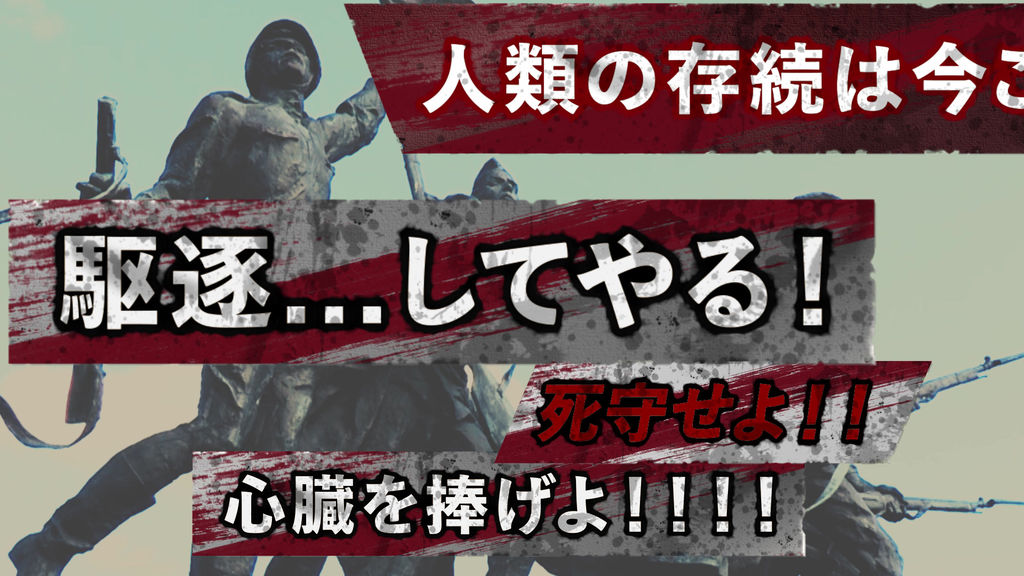
We have created a logo-style telop for a popular anime!
It can be used in a realistic battle atmosphere or when it's time to come!
Isn't it perfect for directing entertainment YouTubers ??
You can customize the color and shape, so you can play a lot!
You can load it into Adobe Premiere Pro and use it immediately.
The following is a description of the product.
[What you can do]
-Change text content, color, font, size, character spacing (tracking), and position
-The size of the text box (belt) is automatically changed according to the text!
-You can also change the color of the text box (band), rounded corners, and aspect ratio.
-You can also change the density of dirt. If the letters are hard to see, try thinning them.
[how to use]
1. Click "Graphics"> "Install Motion Graphics Template" on the top menu of Premiere Pro.
2. Specify the downloaded file (mogrt) and click "Open".
* For (1) and (2), you can also drag and drop the file directly to the "Essential Graphics" panel.
3. It will be installed as a template in the "Essential Graphics" panel.
* If the panel is not displayed, check "Window"> "Essential Graphics" in the upper menu to display it.
4. Find the installed telop from the "Browse" tab of the "Essential Graphics" panel, and drag and drop it onto the timeline panel.
[Method of operation]
With the telop added to the timeline panel selected, you can operate the text content, size, etc. on the "Edit" tab of the "Essential Graphics" panel.
You can also adjust the size and position of the entire telop in "Motion" in the "Effect Control" panel.
Let's do a good video editing!
- Code
- 16198774
- Typ
- 모션 그래픽 템플릿
- Required software
- Premiere Pro und höher
- Dateigröße
- 59.4 MB
- Lizenz
- Lizenzfrei