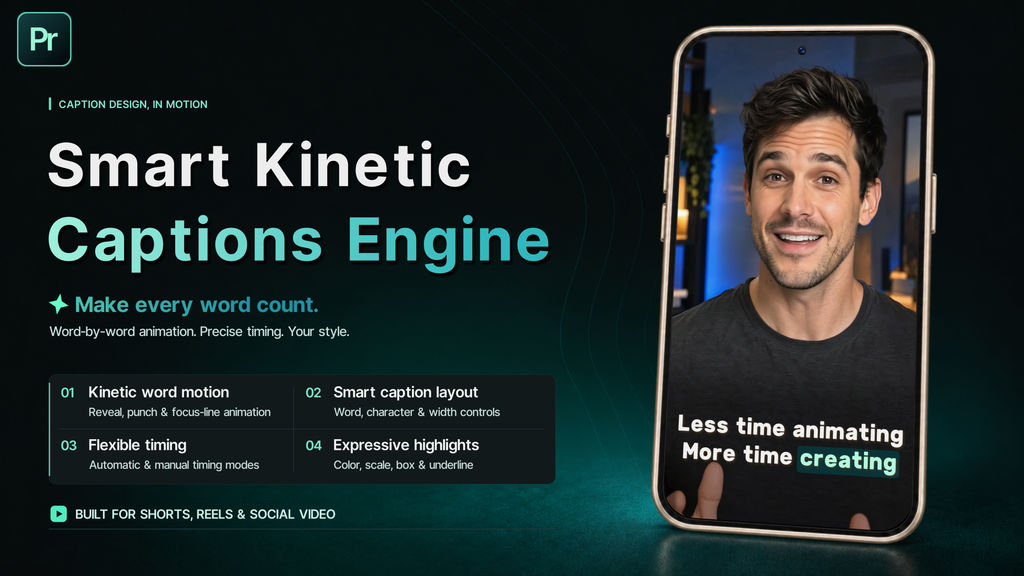
Smart Kinetic Captions Engine is a powerful and flexible kinetic caption animation system for Premiere Pro, designed for content creators, social media videos, podcasts, reels, shorts, interviews, promos and any project that needs engaging, dynamic subtitles.
Transform ordinary captions into expressive, animated typography without manually animating every word. Simply paste your text, choose your caption and timing settings, and bring your subtitles to life with kinetic motion modes, progressive word reveals, animated highlights and smooth transitions.
From clean and minimal subtitles to bold, attention-grabbing animations, Smart Kinetic Captions Engine gives you complete creative control through one flexible system.
KINETIC CAPTION MOTION
Give your captions movement and personality with multiple animation modes:
- Spotlight Focus – Smoothly moves the captions horizontally to keep the active word centered on screen
- Word Punch – Displays one word at a time with a dynamic scale animation for maximum impact
- Focus Line – Highlights the active line while dimming the others, with optional smooth vertical centering
Easily switch between different motion styles to create the perfect visual rhythm for your content.
PROGRESSIVE WORD REVEAL
Control how each word appears on screen with customizable reveal animations:
- Progressive Fade – Smoothly reveals each word through opacity
- Fade + Lift – Combines a soft fade with subtle vertical movement
- Fade + Scale – Reveals each word with smooth scaling and fading
Adjust the reveal duration, movement and scale to create anything from subtle professional captions to energetic kinetic typography. Word Reveal also works with the active word highlighting system.
FLEXIBLE CAPTION MODES
Choose how your text is automatically organized into caption blocks:
- Words Mode – Creates caption blocks using a selected number of words
- Characters Mode – Fills each caption block up to a selected character limit without splitting words
- Smart Width Mode – Calculates the actual visual width of the text and creates the largest caption block that fits your selected maximum width
- Lines Mode – Uses each line from your source text as an individual caption block
SMART TIMING SYSTEM
Synchronize your captions using three flexible timing workflows:
- Equal Timing – Distributes the total duration evenly between all words
- Natural Timing – Automatically adjusts word durations based on their length for a more natural reading rhythm
- Manual Timing – Gives you precise synchronization control using markers on the Timing Markers layer
Use automatic timing for quick results or manual markers when frame-accurate synchronization with speech is essential.
ACTIVE WORD EFFECTS
Highlight the currently spoken word using a fully customizable effects system. Combine:
- Color
- Opacity
- Scale
- Lift
- Background Box
- Underline
Mix and customize active word effects to create your own unique caption styles. A unified animation control keeps the effects synchronized and easy to adjust.
CAPTION BLOCK TRANSITIONS
Create polished transitions between caption blocks with independent entrance and exit animations:
- Fade – Clean and smooth opacity transitions
- Cascade Fade – Progressively reveals or hides characters
- Lift – Adds smooth vertical movement
- Scale + Fade – Combines scaling with opacity animation
- Word Blur + Fade – Animates individual words with blur, fade and subtle vertical movement
Choose different In and Out effects, adjust their durations independently and create seamless transitions that automatically adapt to caption block timing. Word Punch uses its own dedicated animation system.
ADVANCED TEXT STYLING
Customize the appearance of your captions using:
- Text Color – Create the perfect color combination for your content
- Text Stroke – Add customizable outlines for stronger readability and visual impact
- Text Shadow – Add soft or dramatic shadows with adjustable color, opacity, direction, distance and softness
- Text Layout – Customize spacing, line arrangement and visual presentation
- Active Word Box & Underline – Fine-tune padding, size, position and appearance
Every detail can be adjusted to match your branding, creative style and video format.
ONE FLEXIBLE SYSTEM
All major features are managed through a centralized control system, allowing you to experiment with different caption styles without rebuilding your animation. Combine smart timing, kinetic motion, progressive reveals and active word effects to create professional subtitles with minimal effort.
PERFECT FOR:
- YouTube Videos & Shorts
- TikTok
- Instagram Reels
- Podcasts
- Interviews
- Talking-Head Videos
- Vlogs
- Content Creators
- Social Media Content
- Promos & Advertisements
- Explainers
- Tutorials & Educational Content
- Vertical Videos
- Kinetic Typography
Smart Kinetic Captions Engine combines intelligent caption building with powerful kinetic animation tools, giving you the freedom to create modern, engaging subtitles faster and easier than ever before. Make every word count.
- Kód
- 56628756
- Típus
- Motion Graphics template
- Szükséges szoftver
- Premiere Pro (vagy annál újabb)
- Hossz
- 05:00
- Méretek
- 3840px x 2160px
- Fájl méret
- 12.6 MB
- Licenc
- Jogdíjmentes
- Text helykitöltők
- 1